






USB hubs that make crowded setups feel simple
When one laptop port has to handle a charger, mouse, keyboard, flash drive, card reader, and display adapter, the whole setup can feel cramped and unreliable. The right hub changes that fast, as it turns one connection point into a calmer work zone.
In this section of the marketplace, the goal is not just more holes for more plugs. It is better flow on your desk, cleaner cable direction, and steadier performance when several devices need to work together at the same time.
If you are comparing the best AliExpress USB hub for laptop and desktop setup, start with your real routine. Do you need quick file moves, display output, pass through charging, or simply enough room for daily accessories? That answer shapes everything. And one detail often gets missed first.
Choose by connection scenario, not port count
Many hubs look nearly identical in photos. In real use, they behave very differently, as the host connector, power handling, and data support decide what actually works together.
For a simple work desk
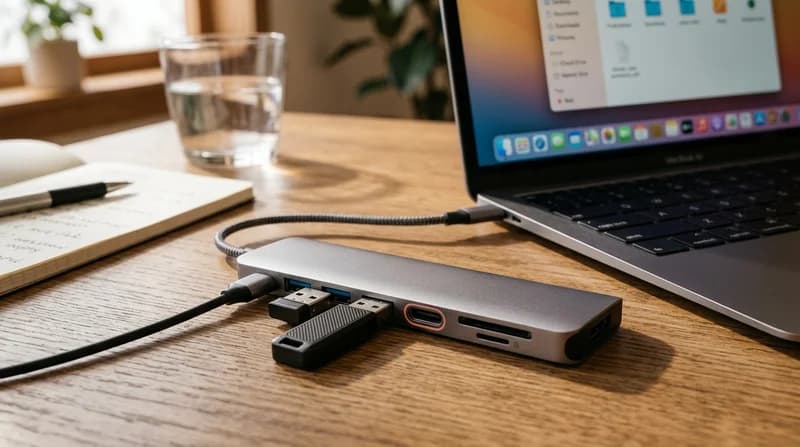
A multi port USB hub for keyboard mouse and flash drive is often enough for daily office flow, as low draw accessories usually need stability more than advanced display support. This type helps keep your hands relaxed and your desk visually cleaner.
- Great for keyboard, mouse, printer receiver, and flash drive
- Useful for desktops that keep ports hidden behind the tower
- Helpful for a neat setup beside mechanical keyboards and microphones
For laptop work with a monitor
A USB C hub for laptop with HDMI and charging makes more sense, as one compact unit can handle power pass through, screen output, and everyday accessories. That means fewer cable swaps and a smoother start every morning.
- Useful for hybrid workstations and shared desks
- Pairs naturally with portable monitors and webcams
- Ideal when your laptop has very few built in ports
For heavier device loads
A powered USB hub for multiple devices is the safer choice, as external drives, bright lights, and several active accessories can overwhelm a bus powered model. You feel the difference in fewer dropouts, fewer reconnect sounds, and steadier performance.
- Better for external storage and power hungry accessories
- Useful for desk setups with constant plug in use
- Smart alongside soldering kits or other tool benches that move files often
What each hub type feels like in daily use
A good desktop USB hub for clean cable management should feel almost invisible. You sit down, connect once, and everything wakes up without drama. No hunting behind a monitor. No awkward reaching. No visual clutter pulling at your attention.
A portable USB hub for travel work setup should feel light in the bag and fast on arrival, as mobile work needs flexibility more than permanent cable routing. In a hotel, meeting room, or shared table, that compact shape can restore a familiar workflow in seconds.
If you move large photo, video, or backup files, look for a USB hub with fast data transfer for external drives, as storage tasks quickly expose weak hubs. The difference is easy to notice when progress bars move smoothly instead of crawling.
So which connection mix gives you the most breathing room without adding bulk?
Costly mistakes to avoid before you choose
Small mistakes in this category can create daily frustration. A hub may look polished and capable, yet still fail your actual setup. That is why this step matters.
Ignoring the host connection type
A USB splitter hub for MacBook and Windows laptop only works as expected when the host port supports the needed protocol, as not every port carries the same data, charging, or video ability. The outside can look the same while the inside behaves differently.
Assuming every USB C hub supports video
Many people expect HDMI to work automatically. It does not, as only certain USB C configurations support display output. If a second screen matters, verify that first.
Choosing by port count alone
Eight ports can sound impressive, yet power and bandwidth still have limits. More openings do not always mean smoother use, as several active devices may compete for the same resources.
Plugging demanding gear into an unpowered hub
Webcams, external drives, lights, and card readers can push a simple hub too far. That leads to flickers, disconnects, or weak charging, as the hub cannot feed everything reliably.
These mistakes are easy to avoid once you know what your setup asks for. The next step is matching the hub to your actual work rhythm.
How to match a hub to your setup in minutes
Choose your main device first
Start with the computer you use most. A slim laptop often needs a USB C hub for laptop with HDMI and charging, as modern machines trade built in ports for thinner bodies. A desktop may benefit more from front access and stable peripheral support.
Count active devices, not total devices
Think about what stays connected together. A mouse and keyboard are light. An external drive, monitor adapter, and charging cable are more demanding, as they place higher load on power or data lanes.
Decide between travel and desk life
If the hub lives in a backpack, compact shape matters. If it stays near your screen, cable length and body weight matter more, as a desk hub should sit firmly and keep cords under control.
Build around your wider setup
Your hub often works best as part of a full electronics routine. You may also want charging cables for cleaner power flow, wireless chargers for your phone, tablet accessories for flexible work, or more options inside electronics.
On the Chinese marketplace, the strongest choice is usually the one that matches your exact device mix, not the one with the longest spec list. On the platform, that means filtering with purpose. On AliExpress, it means choosing for the way your desk actually lives and moves.
When the right hub changes more than your ports
A well matched hub does more than expand connections. It can make the whole desk look calmer, sound quieter, and feel easier to trust, as devices stay recognized and ready when work begins.
That matters during calls, study sessions, editing work, and everyday browsing. One compact connection point can support accessories, storage, charging, and display output in a way that feels controlled rather than crowded.
If your current setup keeps making you unplug one thing to use another, this category is where that friction starts to fade. And once your ports work together smoothly, what else on your desk becomes easier too?